Trimbox: Easy Email Cleaner
- 4.3
- Rating
- 500.00K
- Installs
- Free
- Price

 Analysis by App-foxy
I opened Trimbox: Easy Email Cleaner expecting a simple way to reduce inbox clutter, and that is still the best way to understand it: this is a productivity app built around the unpleasant parts of email maintenance. It helps you deal with old messages, identify mailing lists, and remove subscriptions that no longer deserve space in your inbox. I like the idea because email cleanup is rarely difficult; it is simply repetitive enough that most people keep postponing it.
After using it, my impression is that Trimbox is most useful for people whose inbox has become a mixture of newsletters, promotional messages, forgotten conversations, and harmless digital noise. It is not trying to replace a full email client, and I would not use it as one. Its value comes from giving cleanup a more focused workflow than opening messages one by one and deciding what to do with each.
The app is free to install, although it includes purchases ranging from $3.99 to $39.99 per item. That makes trying the basic experience relatively easy, but it also means I would spend a little time understanding which parts of the cleanup process are available without payment before committing to a larger cleanup project. The age rating is Everyone, and the app runs on Android devices using 7.0 or later.
You May Also Like

 Blood Strike: 2.5 Anniversary
Blood Strike’s Loadouts Turn Every Drop Into a Tactical Gamble
A close look at Blood Strike’s custom loadouts: how fast access to signature weapons reshapes its battle royale rhythm, rewards preparation, and narrows the gap between fights.

 Pandora - Music & Podcasts
Pandora’s Music Is Easy to Start, but Harder to Recover
Pandora’s strength is its low-effort path from a seed to a station. Its weak spot is how much confidence it asks you to place in connection, setup, and quiet recovery.

 8 Ball Pool
 Is Built on Rivalries, Rematches, and Routine
A close look at the rivalries, rematches, shared routines, and unanswered safety questions that turn a quick pool match into a persistent mobile community.

 Samsung Music
’s Quiet Strength Is Playing What You Already Own
Its reach comes less from spectacle than from dependable access to a personal library. That simplicity is both the app’s strongest retention engine and its ceiling.

 AccuWeather: Weather Radar
AccuWeather Review: A Quick, Clear Forecast for Everyday Decisions
For everyday plans, the best forecast is the one you can understand quickly. AccuWeather makes rain timing, radar, and local conditions easy to act on, with a few trade-offs.

 Hill Climb Racing
Why Hill Climb Racing Still Turns Crashes Into One More Run
A tiny car, a bumpy hill and one more upgrade: Hill Climb Racing keeps resurfacing because its simple chaos makes every near-miss feel personal.
More From Our News Desk
View All News


How Trimbox feels in its current form
Trimbox comes from Trimbox and sits firmly in the productivity category. Its public presence is already substantial, with over 500 thousand installs and an average rating of 4.3 from around 8 thousand ratings. Those figures suggest that the idea connects with a common problem, although an inbox-cleaning tool still needs to be judged by how safely and clearly it handles personal email rather than by popularity alone.
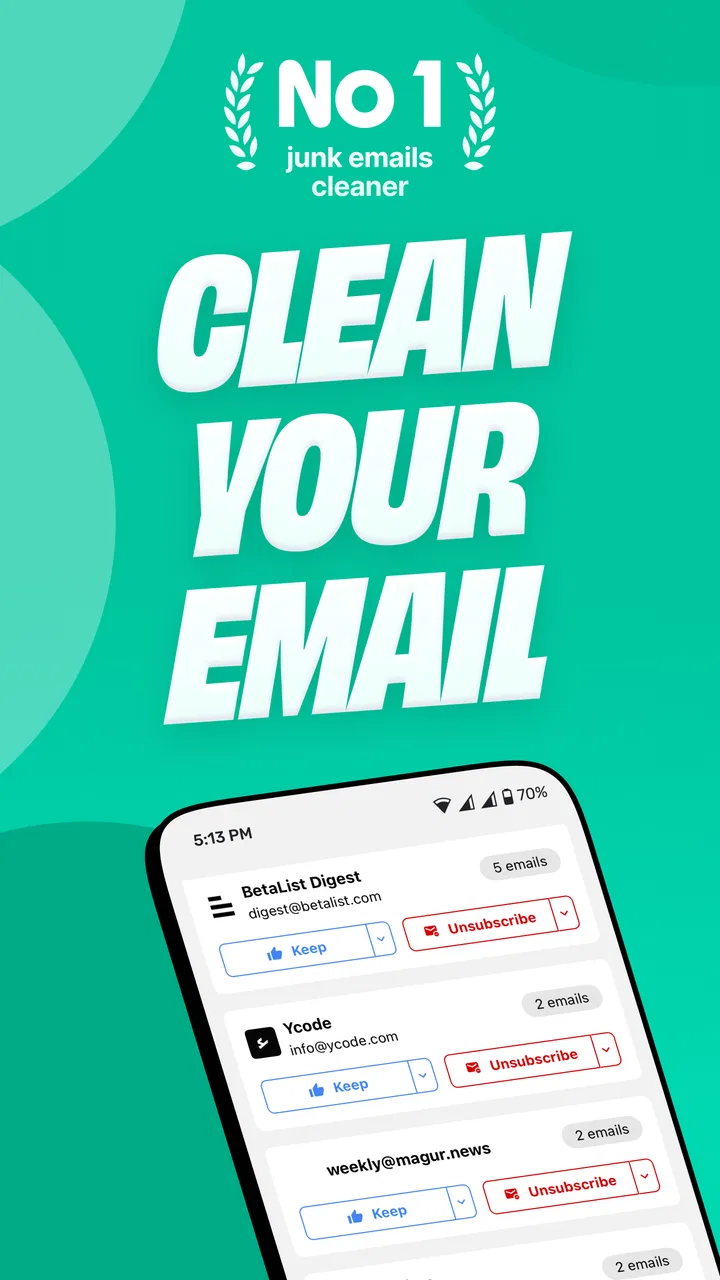
The first thing I noticed is that the app makes inbox maintenance feel like a separate task instead of an endless background obligation. That distinction matters. In a normal mail app, deleting old messages and unsubscribing from lists are actions scattered across individual conversations. Here, the purpose is narrower, so I could approach cleanup with a plan: remove obvious clutter first, review recurring senders next, and leave important correspondence alone.
I would describe the interface as useful when you already know what kind of mess you want to solve. Someone who says, “I have too many newsletters,” will probably get more value from it than someone who only wants a general-purpose email application. The app’s identity is not about composing messages, managing calendars, or replacing Gmail, Outlook, or another familiar client. It is about reducing the maintenance burden around an existing inbox.
A realistic cleanup session
Imagine a busy week in which you sign up for a discount, download a guide, join an online service, and receive several automated updates. None of those messages seems important at the time. A few months later, the inbox contains a long trail of recurring mail, and searching for a receipt or work conversation becomes irritating. This is the situation where I found the concept most convincing.
I would start with senders I recognize as promotional rather than immediately deleting everything old. That small distinction is important because age alone is not a reliable measure of value. An old travel confirmation, tax message, warranty record, or account notice may still matter. Trimbox is more helpful when I use it to surface cleanup candidates, while I remain responsible for deciding what deserves to stay.
My preferred routine would be a short, deliberate session rather than a dramatic purge. I would review one group of recurring messages, remove the ones I no longer want, and then stop. This reduces the chance of making a rushed decision simply because the inbox looks overwhelming. It also turns the app into a maintenance tool instead of a one-time emergency button.
What makes the workflow different from ordinary email cleanup
The usual alternative is manual sorting inside an email client. That approach gives excellent control, but it is slow when the real problem is volume. Search operators, folders, labels, filters, and bulk selection can work well for experienced users, yet they require the user to design the system. Trimbox is more approachable for someone who does not want to build a complicated set of rules just to get rid of unwanted mail.
On the other hand, manual cleanup remains better when the inbox contains sensitive records or a complicated mixture of personal and professional messages. A conventional client lets me inspect the exact sender, subject, date, attachments, and conversation context before acting. I would choose that route for legal, financial, medical, or work-related mail where a broad cleanup decision could have consequences.
That is the central trade-off: Trimbox can reduce friction, but convenience should not replace judgment. The app is strongest when the unwanted messages are clearly repetitive and low-risk. It is less suitable when the user needs a forensic review of every message or a carefully documented archive.
What has changed and how existing users may experience it
The current version is 2.1.182, and the app was released on December 17, 2023. I see that version information as a sign that the product has moved beyond a first experiment and is being maintained as a usable tool. Still, a version number by itself does not tell me that every workflow is perfect. The important question is whether the present build makes cleanup understandable, predictable, and easy to undo mentally before I confirm an action.
For someone returning after earlier use, the most meaningful improvement is likely not a flashy new feature but the maturity of the overall process. Email cleanup tools live or die by small details: whether categories are easy to interpret, whether the app makes bulk actions feel deliberate, and whether it helps users distinguish a mailing list from a message they should keep. I would pay closer attention to those areas than to cosmetic changes.
Existing users should also remember that inbox habits change. A cleanup that worked several months ago may not match the way the same mailbox looks today. New subscriptions appear, old ones become irrelevant, and important services may start sending messages from addresses that were previously unfamiliar. I would revisit the results rather than assume earlier decisions should be repeated automatically.
Why the version matters without telling the whole story
Productivity apps often improve through small refinements, and Trimbox’s present version gives me a reason to evaluate it as an active tool rather than a static utility. However, I would not treat the release date or version as proof that the app fits every mailbox. The quality of an email cleaner depends heavily on the account being cleaned, the user’s tolerance for automation, and the clarity of the decisions shown on screen.
That is also why I would test it on a manageable inbox first. If the account contains years of mixed correspondence, starting with the entire mailbox can make any cleaner feel risky. A smaller review gives me a chance to understand how Trimbox presents senders and actions before I trust it with a larger batch.
What existing users should do differently
I recommend separating “unsubscribe” decisions from “delete” decisions in your thinking. They solve different problems. Unsubscribing aims to reduce future incoming messages, while deleting addresses the clutter already present. Doing one without the other can leave the inbox looking better temporarily without changing the flow of new mail.
I would also keep a small mental list of senders that must remain visible, such as employers, schools, banks, travel providers, and services used for account recovery. Even if a message looks automated, it may be useful later. Treating recurring mail as disposable simply because it is repetitive is one of the easiest ways to create a cleanup mistake.
A third useful habit is to clean by purpose rather than by age. “Promotional mail I never read” is a safer target than “everything older than a certain point.” The first description reflects how I use the messages; the second relies on a shortcut that cannot understand why an old email might still matter.
Where the app still needs careful handling
The biggest limitation is not necessarily a missing button. It is the unavoidable risk that comes with simplifying a personal inbox. Any tool that helps process many messages at once asks me to trust its presentation and my own review. If I am distracted, I may approve an action too quickly. That is true even when the app’s goal is sensible.
I also would not expect Trimbox to solve every email problem. It can help with old messages and mailing lists, but it cannot make an overloaded account more organized in every possible way. If the real issue is poor folder structure, missing labels, scattered attachments, or a need to preserve records for work, I would combine it with the organization tools already available in the main email service.
Another point to consider is cost. The app is free, but optional purchases are part of the experience, with individual items priced between $3.99 and $39.99. I would not assume that installing the app means every cleanup capability is included at no cost. Before starting a large project, I would check what the free experience covers and whether the paid option matches the size of my problem.
The app may also be a poor fit for people who already have a reliable manual system. If you are comfortable creating filters, reviewing mailing lists, and using bulk actions in your existing email client, Trimbox may add another layer rather than save time. Its appeal is much stronger for people who want a guided cleanup focus and do not enjoy configuring email rules.
Privacy and trust should shape your decision
Because this is an email-cleaning app, I would think carefully about trust before connecting an account. Email is not just a list of advertisements. It can contain private conversations, receipts, password-reset messages, travel plans, and documents. I would read the app’s current permission and privacy explanations directly in the store and during setup, then decide whether the convenience is worth the access requested.
This is not a criticism unique to Trimbox; it is a sensible standard for every service that works with an inbox. The more sensitive the account, the more conservative I would be. For a secondary inbox full of newsletters, the decision may feel straightforward. For a primary work or family account, I would begin with a limited cleanup and avoid treating convenience as permission to stop reviewing carefully.
Who should use it, and who should skip it
I would recommend Trimbox to someone whose inbox is dominated by newsletters, promotions, and old low-value messages, especially if manual cleanup has been postponed repeatedly. It is also a good match for users who understand that unsubscribe and deletion are separate jobs but want them brought into a more focused productivity routine.
I would be more cautious about recommending it to users who need strict archival control, who manage several complex accounts, or who cannot risk overlooking an old message. People with a carefully maintained folder and filter system may gain little from adding another cleaner. In those cases, the built-in tools of the existing mail provider may be slower but more transparent.
For families or shared devices, I would keep the account owner involved in every meaningful decision. An inbox can contain information that another household member should not review casually, even if the goal is only to remove newsletters. The Everyone age rating describes broad suitability, but it does not remove the need for adult judgment around private email accounts.
My final view after using it
Trimbox: Easy Email Cleaner is a focused answer to a very ordinary problem: an inbox that has accumulated more subscriptions and old messages than anyone wants to handle manually. I appreciate that its purpose is clear. It does not need to become a full email client to be useful, and I would rather see a cleaner do one job understandably than bury cleanup inside a crowded collection of unrelated tools.
My recommendation comes with a condition: use it as an assistant, not as an automatic decision-maker. Start with obvious promotional senders, review before confirming, and protect messages that may matter later. The most effective workflow is gradual cleanup followed by better subscription habits, not one hurried attempt to erase years of email.
The current build, 2.1.182, makes the app worth considering for Android users on 7.0 or newer who want a dedicated productivity tool for inbox maintenance. Its free entry point lowers the barrier to trying it, while the in-app purchase range means careful users should understand the upgrade path before paying. I would watch future updates for clearer control over bulk actions, stronger confidence around account safety, and refinements that make it easier to tell useful recurring mail from disposable noise.
In the end, I would install it for a neglected personal inbox or a newsletter-heavy secondary account, then judge the results after a small test. If that first session makes cleanup feel calmer without making me nervous about what might disappear, Trimbox has earned a place in my routine. If I need precise archiving or complete control over every message, I would stay with the tools in my regular email client instead.
FAQs for Trimbox: Easy Email Cleaner
01What is Trimbox: Easy Email Cleaner and what does it do?
Trimbox: Easy Email Cleaner is designed to help you organize and reduce clutter in your email inbox. It can identify unwanted messages, newsletters, promotional emails, and other low-priority content so you can review and remove them more efficiently. Instead of searching through every message manually, the app presents cleanup suggestions and sorting tools intended to make inbox maintenance faster and easier.
02Is Trimbox safe to use with my email account?
Before using Trimbox, you should review the permissions it requests and read its privacy policy carefully. Email-cleaning services generally need account access to scan messages and identify items for deletion or unsubscribing. A trustworthy app should explain how your data is handled, whether messages are stored, and how access can be revoked. Only connect an account if you are comfortable with these terms.
03Can Trimbox delete important emails by mistake?
Trimbox is intended to help with email cleanup, but no automatic or semi-automatic tool can understand every personal email perfectly. You should carefully check the messages selected for deletion before confirming an action, particularly when dealing with receipts, travel information, work correspondence, account alerts, or legal documents. Keeping a backup or using your email provider’s recovery folder is also a sensible precaution.
04Does Trimbox unsubscribe me from unwanted newsletters?
One of Trimbox’s useful purposes is helping users deal with recurring newsletters and promotional messages. Depending on the sender and the email provider, the app may offer an unsubscribe option or guide you toward removing future messages. Results can vary because some mailing lists process requests slowly, while others may not support automatic unsubscribing. Always verify that unwanted emails stop after cleanup.
05Is Trimbox free, and are there subscriptions or in-app purchases?
Trimbox may offer basic email-cleaning features at no cost while reserving additional tools, larger cleanup limits, or advanced organization options for a paid plan. Pricing, trial periods, and subscription conditions can change, so check the current listing and purchase screen before starting. If you activate a trial, note the renewal date and cancel through your app store settings if you decide not to continue.
Pros
- Quickly identifies newsletters and promotional emails for bulk cleanup.
- Swipe-based controls make reviewing large inboxes feel simple and fast.
- Helps reduce inbox clutter without requiring advanced email-management skills.
- Supports more mindful inbox maintenance by highlighting recurring senders.
- Useful for users who want a visual alternative to traditional email filters.
Cons
- Requires access to email data
- which may concern privacy-conscious users.
- Automatic categorization may occasionally place messages in the wrong group.
- Some useful cleanup features may be limited to a paid subscription.
- Processing large inboxes can take time
- especially on older devices.
- Deleting emails in bulk may require careful review to avoid removing something important.

Trimbox: Easy Email Cleaner
Gallery